Now processing 50K+ documents per week

Your documents have data.
Extraly gets it out.

Drop a PDF, snap a photo, or upload a scan. Our AI reads every table, field, and line item — then hands you clean spreadsheet data. No templates. No manual entry. No kidding.

Free to try — 5 pages per day, no account needed

Try it right now

Results in under 10 seconds

5 free/day

Drop your file here

or

PDF, JPG, PNG — up to 100MB

The problem

Manual data entry is slow, expensive, and full of mistakes

  • Copying numbers from PDFs into spreadsheets takes hours
  • Every bank statement has a different format
  • One wrong decimal ruins an entire reconciliation

The fix

Extraly reads your documents like a human — but faster and without errors

Any document, any layout

Our AI understands tables, columns, and fields across thousands of document formats. No templates to configure — it just works.

Accurate to the decimal

Validated against 1.5 million documents. The AI catches misaligned columns, merged cells, and multi-page tables that trip up other tools.

Your data, your format

Export to Excel, CSV, JSON, or XML. Edit any field before downloading. Connect via API for automated workflows.

Upload. Extract. Export.

Three steps. Under a minute. Zero configuration.

1

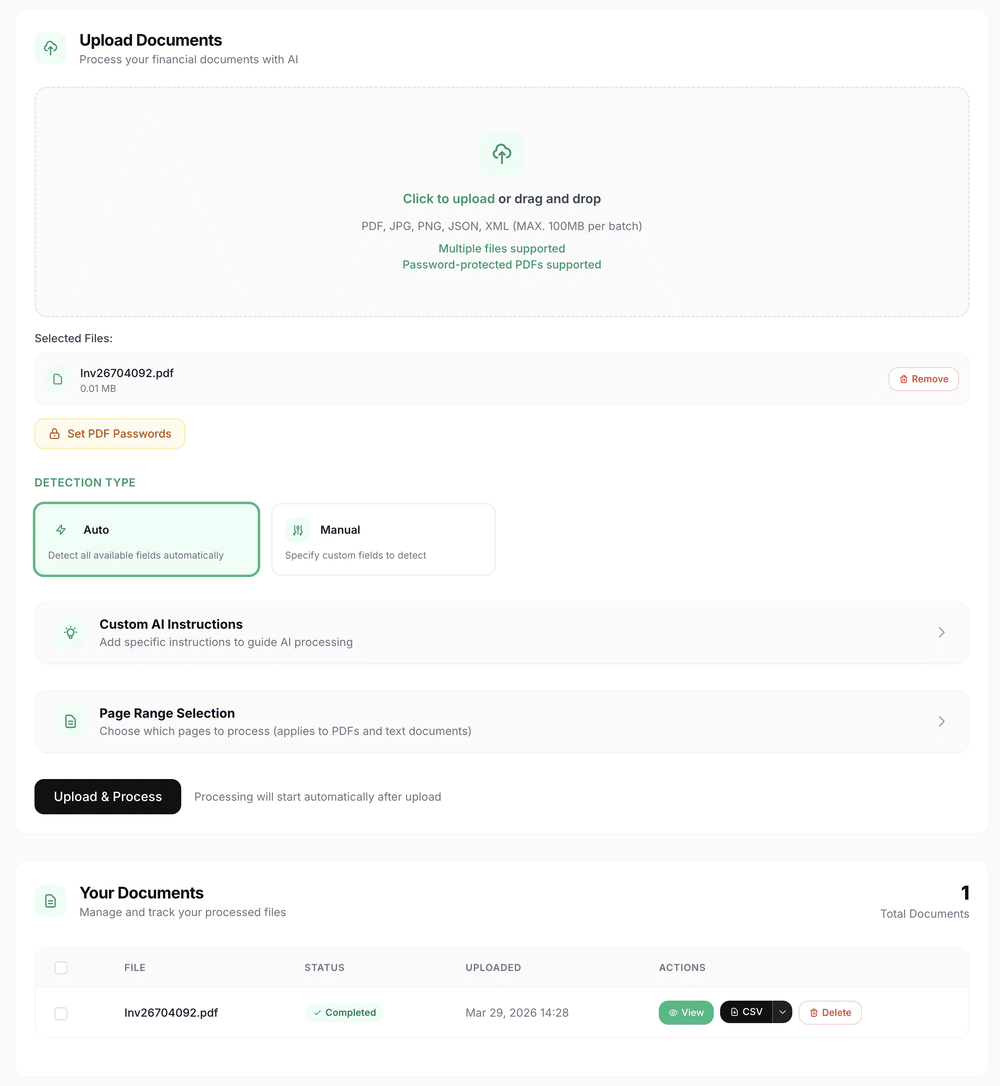
Upload your document

Drag a PDF, drop a photo, or paste a screenshot. Multi-page and batch uploads are supported.

2

AI reads and extracts

The AI identifies every table, field, date, and amount — automatically detecting the document type and structure.

3

Review and export

Check the extracted data, edit any field inline, then export as Excel, CSV, JSON, or XML.

.xlsx .csv .json .xml

See exactly what you get

Clean rows and columns extracted from messy PDFs — ready for your spreadsheet or accounting software.

app.extraly.ai/dashboard

Dashboard screenshot goes here

Edit any cell before exporting

Multi-page documents handled automatically

One-click export to Excel, CSV, JSON, or XML

Document types

If it has data in it, Extraly can extract it

Bank Statements

Chase, HSBC, Wells Fargo, Barclays — we support 100+ banks. Transactions, dates, amounts, running balances.

Invoices

Line items, totals, tax, vendor info, due dates. Works with any invoice layout — no template setup needed.

Receipts

Take a photo with your phone. Merchant name, items, totals, and tax extracted in seconds.

Credit Card Statements

Convert monthly statements into categorized spreadsheets. Track spending patterns across cards.

Financial Reports

Balance sheets, profit & loss, cash flow — transform complex reports into analysis-ready data.

Any Structured Document

Inventory lists, purchase orders, contracts, customs forms. Define custom fields and the AI follows your rules.

Under the hood

Why teams pick Extraly over manual entry, Tabula, or Docparser

Zero template setup

Unlike Docparser, you don't build templates per document type. Our AI auto-detects layouts, tables, and fields.

Scans, photos, screenshots

Unlike Tabula, we handle scanned PDFs and phone photos. Advanced OCR + AI — no scanner required.

Password-protected PDFs

Upload encrypted PDFs directly. Enter the password once — we decrypt, extract, and never store the password.

REST API with webhooks

Automate document processing in your own apps. POST a file, get structured JSON back. Webhook notifications on completion.

Custom extraction rules

Define which fields matter. Set categories, validation rules, and chart-of-accounts mapping. The AI follows your instructions.

Bank-grade security

AES-256 encryption. Automatic deletion after your retention window. Your documents are never used for model training.

Built on real volume, not demo data

1.5M+
documents processed
99.1%
field-level accuracy
~5s
average per page
100+
bank formats recognized

What our users actually say

"We switched from manually copying bank statements into Excel. Extraly processes our entire month of statements in the time it used to take to do one."
PS
Priya Sharma
Controller, Meridian Logistics
"The API is exactly what we needed. We pipe invoices straight from email into Extraly and get structured data in our database without human involvement."
DO
Daniel Okafor
Lead Engineer, PayFlow
"I was skeptical about accuracy on scanned receipts. Tested with 200 of our worst-quality scans and it nailed 198 of them. Sold."
ML
Maria Lindqvist
Bookkeeper, self-employed

One price per page. No hidden fees.

Every plan includes all document types, all export formats, and full accuracy. The only difference is volume.

Free

Perfect for getting started with basic document processing

Free
10 pages
  • AI document processing
  • Password protected PDF support
  • All export formats
  • Merge multiple documents
  • Email support
  • Custom AI instructions
Start now

Starter

Great for small businesses and regular document processing

$5/mo
200 pages/month
  • AI document processing
  • Password protected PDF support
  • All export formats
  • Merge multiple documents
  • Priority support
  • API access
  • Custom AI instructions
Start now

Business

Perfect for growing businesses with mid-volume processing needs

$10/mo
500 pages/month
  • AI document processing
  • Password protected PDF support
  • All export formats
  • Merge multiple documents
  • Priority support
  • API access
  • Custom AI instructions
Start now
MOST POPULAR

Corporate

Perfect for high-sized businesses with high-volume processing needs

$20/mo
2,000 pages/month
  • AI document processing
  • Password protected PDF support
  • All export formats
  • Merge multiple documents
  • Priority support
  • API access
  • Custom AI instructions
Start now

Custom

Tailored solutions for enterprise clients with specific requirements

Talk to us
  • Unlimited pages
  • Custom integrations
  • Dedicated support
  • SLA guarantees
  • Custom data retention
  • Advanced API access
  • White-label options
Talk to us

Common questions

Bank statements (100+ banks), invoices, receipts, credit card statements, financial reports, inventory lists, purchase orders, and any document with tabular data. We support PDF, JPG, PNG, and photos taken with a phone camera.

Manual entry is slow and error-prone. Tabula only works on digital PDFs — not scans or photos — and requires you to select table regions manually. Extraly uses AI to automatically detect document structure, works on scans and photos, and handles hundreds of pages in minutes.

We measure 99.1% field-level accuracy across our full document volume. For standard bank statements from major banks, accuracy is typically 99.5%+. Every extraction includes an inline editor so you can verify and correct any field before exporting.

Yes. All data is encrypted with AES-256 in transit and at rest. Documents are automatically deleted after your configured retention period (default 90 days, adjustable from 1 to 365). We never use uploaded documents for AI model training.

Yes. Enter the PDF password during upload. We decrypt the file for processing and never store the password. The original encryption is not affected.

Yes. A full REST API is available on all paid plans. Upload documents via POST, receive structured data as JSON, and get notified via webhooks when processing completes. Documentation includes examples in Python, JavaScript, PHP, and cURL.

Excel (.xlsx), CSV, JSON, and XML. All formats are available on every plan, including free. You can also retrieve data programmatically via the API.

Most single-page documents finish in under 10 seconds. A typical 12-page bank statement takes 30-60 seconds. You see real-time progress and get notified when processing completes.

Stop typing. Start extracting.

Upload your first document and see results in seconds. No signup required.

Free plan includes 10 pages/month — no credit card needed

Try Extraly free